Welcome points
When this step is done, new members get a reason to sign up.
In EarnKit: Program › Ways to Earn
Welcome points are a once-only award that needs no purchase. By default they are added the first time an eligible customer opens their Rewards page. You can instead ask customers to claim them.
Before you start
Go to Program › Ways to Earn, and make sure Enable ways to earn is on.
Set up welcome points
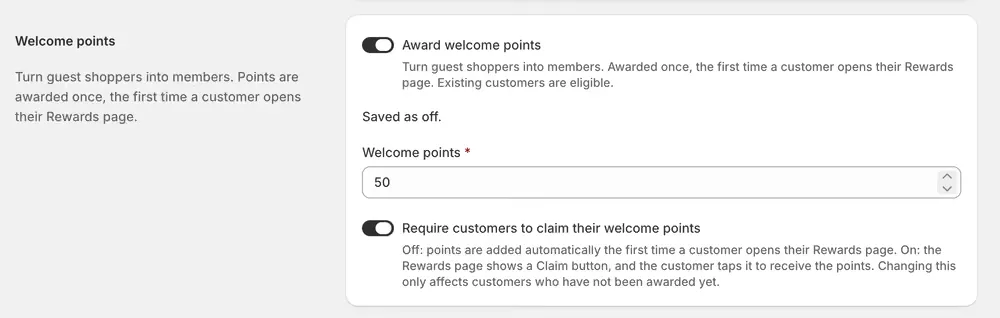
- Turn on Award welcome points.
- Set Welcome points to the number of points to award, a whole number of at least 1.
- Decide whether to turn on Require customers to claim their welcome points.
- Save your changes.
Two things worth getting right
Require claiming, unless you have a reason not to. With it off, every customer who opens their Rewards page is given the points whether they wanted them or not, including people who never come back. Those are points you owe against a customer who is not engaged. With it on, only a customer who taps Claim gets them, so the balance you carry belongs to customers who showed up for it.
Keep the amount modest. Welcome points cost you nothing to award and everything to redeem, and they go to people who have not bought anything yet. A figure that quietly hands out most of a reward for signing up is a discount on a first order, not a loyalty program. Set it so it is a start toward the first reward rather than most of the way there.
Changing the claim setting only affects customers who have not been awarded yet. Anyone who already has their welcome points keeps them.
You can see and set the points amount even while the switch is off, so you always know what you’re about to turn on.
What customers see
By default the points are added automatically, the first time a customer opens their Rewards page, with nothing to request or claim. If Require customers to claim their welcome points is on, they see a Claim your welcome points section with a Claim button instead.
Good to know
- This is a once-only award. In automatic mode the first eligible Rewards page visit gives the points; in claim mode the customer gets them only after selecting Claim.
- Existing Shopify customers are eligible on their first eligible visit to the Rewards page while welcome points are on. Customers imported with a starting balance, including a zero-point starting balance, are not eligible.
- If you turn this off, existing awards are unaffected, and no more welcome points are given until you turn it back on.