Choose your points rate and first reward
When this step is done, customers have a rate to earn at and a first reward to work toward.
This is the one step with real decisions in it. Everything on this screen can be changed later, so a sensible starting point is enough.
Want to try the numbers first? Our calculator lets you put in your own order value and margin, and shows what a reward at a given rate would actually cost you. Open the loyalty program calculator , then come back and enter the rate and reward you settled on.
Start from an example
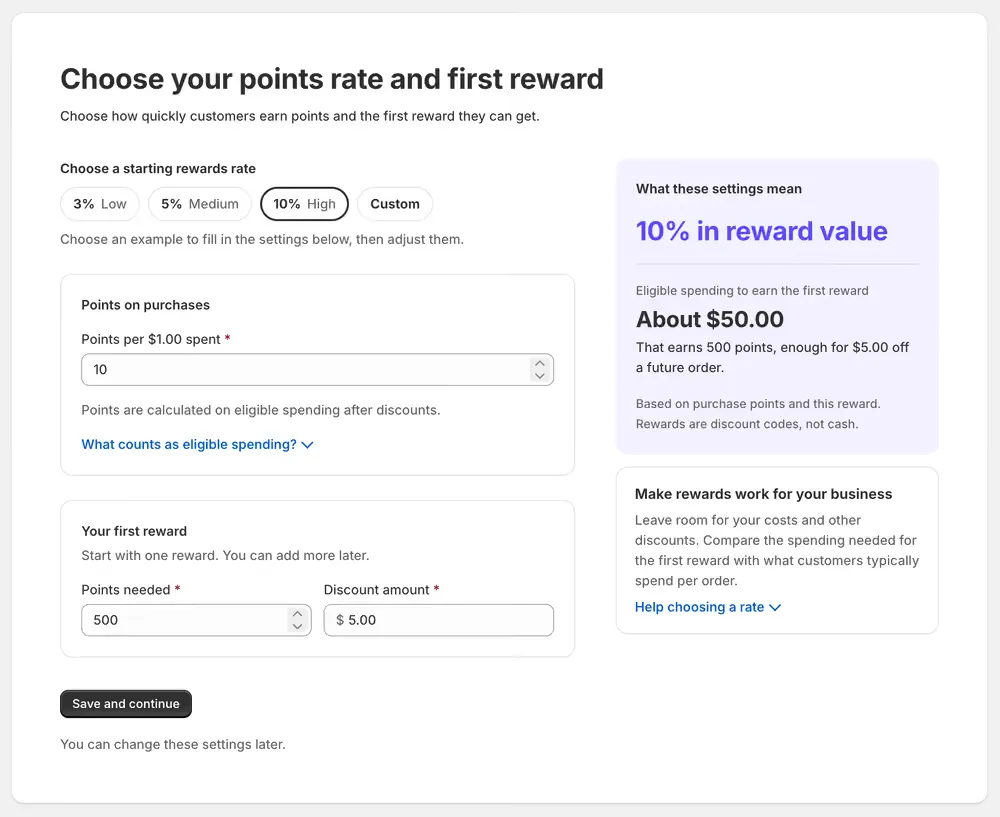
Choose a starting rewards rate offers three examples, and the percentage is the share of a customer’s spending that comes back to them as reward value:
| Example | Reward value | What it fills in |
|---|---|---|
| Low | 3% | 3 points per $1 |
| Medium | 5% | 5 points per $1 |
| High | 10% | 10 points per $1 |
| Custom | Your own | 1 point per $1, for you to change |
Choosing one fills in the fields below for you to adjust. It is a starting point, not a commitment, and the chips light up again whenever your numbers match one of them.
Points on purchases
Points per $1.00 spent is how many points a customer earns for each unit of currency. Points are calculated on eligible spending after discounts: the merchandise total, with shipping, taxes and gift card purchases excluded. What counts as eligible spending? on the screen opens the same detail.
Your first reward
Start with one reward. You can add more later from Program › Rewards.
| Field | What it means |
|---|---|
| Points needed | How many points a customer must have before they can get this reward |
| Discount amount | How much money the reward takes off an order, in your store’s currency |
A reward is a fixed amount off, not a percentage, and it becomes a single-use discount code in the customer’s account.
Check what the numbers mean
As you type, the panel on the right works out the consequence of your two settings together:
- The reward value, as a percentage of what a customer spends.
- The eligible spending needed to reach the first reward, and what that reward is worth.
In the example above, 10 points per $1 with a 500-point reward for $5.00 off means a customer spends about $50.00 to earn their first reward, which is 10% back in reward value.
Compare that spending figure against what your customers typically spend in one order. If the first reward takes several orders to reach, most customers will never see it. Leave room for your margins and any other discounts you run.
Choose Save and continue when you are happy with both numbers.